CONNECTION PROBLEM
Posted: Fri Feb 13, 2026 1:52 am
Hi everyone! im Edison, I’ve been working on a UAEFI Rev E (this is my 6th unit for an installation, and I’ve had no issues before). I connected the board to the PC and opened TunerStudio to work on a base map before connecting the unit to the engine (same as usual). It connected without any problems, but after a minute or less, the connection reset with a warning message about a Watchdog clock reset (I’m not familiar with that and couldn't find it in the TunerStudio settings).
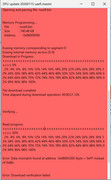
I tried a firmware reset, but the process stopped with a warning. After that, the PC stopped recognizing the device as 'rusEFI'; instead, it shows up as 'USB SERIAL COM X'. I’ve also tried to upload the firmware via the UAEFI bundle in DFU auto mode, but the console closes automatically after a few seconds.
I also tried a manual DFU (powering the device while holding the PROG button). The PC recognizes the device as 'STM32 BOOTLOADER', but when I click on 'Manual DFU mode', it shows this message:
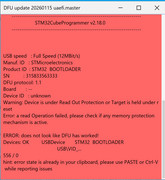
that's all i can try by myself, so i came here for help greetings from Chile!
I tried a firmware reset, but the process stopped with a warning. After that, the PC stopped recognizing the device as 'rusEFI'; instead, it shows up as 'USB SERIAL COM X'. I’ve also tried to upload the firmware via the UAEFI bundle in DFU auto mode, but the console closes automatically after a few seconds.
I also tried a manual DFU (powering the device while holding the PROG button). The PC recognizes the device as 'STM32 BOOTLOADER', but when I click on 'Manual DFU mode', it shows this message:
that's all i can try by myself, so i came here for help
greetings from Chile!