CONNECTION PROBLEM

Post Reply
ediboost
Posts: 3
Joined: Fri Aug 02, 2024 11:51 pm
Github Username: ediboost

CONNECTION PROBLEM

Post by ediboost »

Hi everyone! im Edison, I’ve been working on a UAEFI Rev E (this is my 6th unit for an installation, and I’ve had no issues before). I connected the board to the PC and opened TunerStudio to work on a base map before connecting the unit to the engine (same as usual). It connected without any problems, but after a minute or less, the connection reset with a warning message about a Watchdog clock reset (I’m not familiar with that and couldn't find it in the TunerStudio settings).

I tried a firmware reset, but the process stopped with a warning. After that, the PC stopped recognizing the device as 'rusEFI'; instead, it shows up as 'USB SERIAL COM X'. I’ve also tried to upload the firmware via the UAEFI bundle in DFU auto mode, but the console closes automatically after a few seconds.

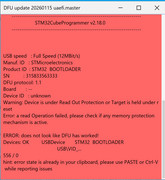
I also tried a manual DFU (powering the device while holding the PROG button). The PC recognizes the device as 'STM32 BOOTLOADER', but when I click on 'Manual DFU mode', it shows this message:
Image


that's all i can try by myself, so i came here for help :) greetings from Chile!
Last edited by ediboost on Fri Feb 13, 2026 3:25 am, edited 1 time in total.
User avatar
AndreyB
Site Admin
Posts: 14809
Joined: Wed Aug 28, 2013 1:28 am
Location: Jersey City
Github Username: rusefillc

Re: CONNECTION PROBLEM

Post by AndreyB »

Warning: Device is under Read Out Protection or Target is held under reset

this seems like a variation of https://github.com/rusefi/rusefi/issues/8926 problem

Good news that you have DFU still working, in some cases it's even worse!

We have stm32-remove-read-out-protection.bat in the bundle - that one would reset RDP. Once RDP is reset, you should be able to DFU erase and re-load.
Very limited telepathic abilities - please post logs & tunes where appropriate - http://rusefi.com/s/questions

Always looking for C/C++/Java/PHP developers! Please help us see https://rusefi.com/s/howtocontribute
ediboost
Posts: 3
Joined: Fri Aug 02, 2024 11:51 pm
Github Username: ediboost

Re: CONNECTION PROBLEM

Post by ediboost »

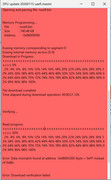
Thank you Andrey for your fast response, i run the stm32-remove-read-out-protection.bat. now i can erase the DFU with no issue but when i click on the MANUAL DFU mode, now runs but fails on the middle of the update. shows this:

Image

Error: Data mismatch found at address 0x0800C000 (byte = 0xFF instead of 0x86)
Error: Download verification failed

any idea? i was so happy :lol:
User avatar
AndreyB
Site Admin
Posts: 14809
Joined: Wed Aug 28, 2013 1:28 am
Location: Jersey City
Github Username: rusefillc

Re: CONNECTION PROBLEM

Post by AndreyB »

See linked ticket

Now you would need srm32cube programmer, or wait until we create a similar file to remove page protection write bits
Very limited telepathic abilities - please post logs & tunes where appropriate - http://rusefi.com/s/questions

Always looking for C/C++/Java/PHP developers! Please help us see https://rusefi.com/s/howtocontribute
ediboost
Posts: 3
Joined: Fri Aug 02, 2024 11:51 pm
Github Username: ediboost

Re: CONNECTION PROBLEM

Post by ediboost »

THANK YOU SO MUCH!

she's back! i connect the board via STM32cube programmer, the software showed that I needed to click on 3 missing checkboxes. After that, I was able to load the firmware normally in manualDFU.

now TunerStudio connects perfectly with no resets or warnings :D

xmas is back :lol:
Post Reply